Anlık bildirim
Fotoğraf, duyuru ve gün özeti paylaşıldığı anda velinin telefonuna düşer.
Anaokulu ve kreşlerde veli iletişimi
Anaokulu ve kreşlerde veli, çocuğunun gününü mesaj grubundan değil kurumun kendi uygulamasından öğrenir. Öğretmen kaydı girdiği anda bildirim gider; her paylaşım hedefiyle ve zamanıyla kayıt altında kalır.
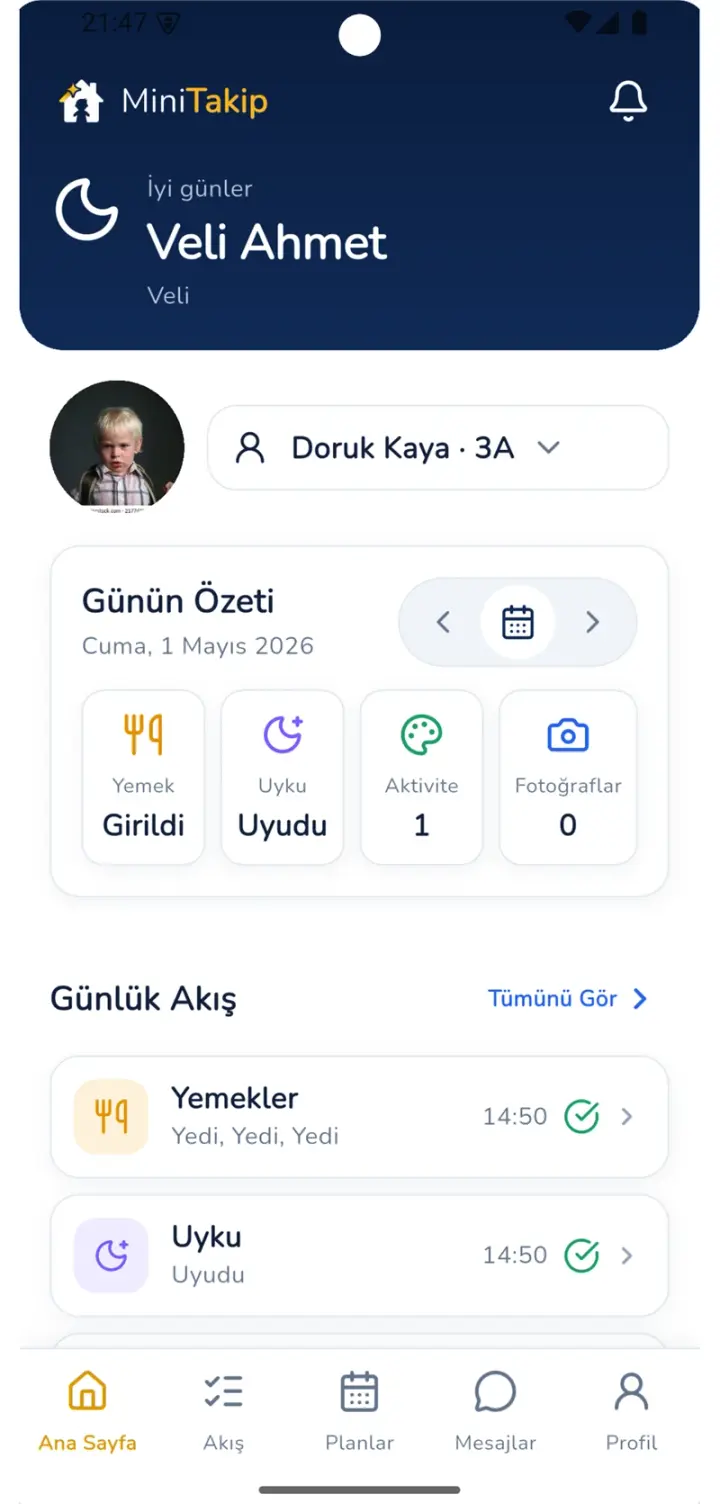
Veli ekranı
Yemek, uyku, etkinlik, fotoğraf ve öğretmen notu aynı akışta toplanır. Veli tarih seçerek geçmiş günlere döner; bilgi mesaj geçmişinde kaybolmaz.
Karşılaştırma
Mesaj grubu hızlı kurulur ama kurumsal bir bilgilendirme kanalı değildir. Kişisel numaralar açıkta kalır, bilgi akışı denetlenemez.
Sistem kapsamı
Fotoğraf, duyuru ve gün özeti paylaşıldığı anda velinin telefonuna düşer.
Duyurular hedef kitlesi seçilerek yayımlanır ve arşivde kalır.
Öğretmen–veli mesajlaşması kurum politikasına bağlıdır; denetim ekranından izlenir.
Sınıf içi paylaşımlar yalnızca ilgili velilere açılır, grup ortamına dağılmaz.
Yoklama, beslenme, uyku, etkinlik ve öğretmen notu tek özette birleşir.
Aylık program, bülten ve veli katılım çağrıları aynı uygulamadan paylaşılır.
Bilgi akışı
Anaokulu ve kreş veli uygulaması tek yönlü bir bildirim aracı değildir; kurumun onay ve denetim adımlarını içerir.
Sınıfın günlük akışına beslenme, uyku, etkinlik veya gözlem notu işlenir.
İletişim politikası, velinin yanıt hakkını ve paylaşımın kapsamını belirler.
İçerik yalnızca ilgili velilere anlık bildirimle ulaşır.
Paylaşım ve mesajlar zaman damgası ve revizyon geçmişiyle birlikte tutulur.

KVKK ve gizlilik
Çocuk fotoğrafı ve veli iletişim bilgisi kişisel veridir. Kurumsal bir kanal, bu verinin nerede durduğunu bilinir kılar.
Sorular
Kurum, veliyi öğrenciyle eşleştirir. Veli uygulamayı App Store veya Google Play'den indirip kendi hesabıyla giriş yapar ve yalnızca kendi çocuğuna ait akışı görür.
Bunu kurum belirler. İletişim politikası ayarıyla velinin yanıt verip veremeyeceği tanımlanır; mesajlar kurum yönetim merkezindeki denetim ekranında kayıt ve revizyon geçmişiyle görünür.
Paylaşım sınıf ve hedef kitle seçilerek yapılır; içerik yalnızca ilgili velilere açılır. Kurum dışına açık bir grup ortamı oluşmaz.
Evet. Veli ekranından tarih seçilerek önceki günlerin yoklama, beslenme, uyku, etkinlik ve öğretmen notu kayıtları görüntülenebilir.
İlgili sayfalar
MiniTakip'i indirip hazır demo üzerinden velinin ne gördüğünü hesap açmadan deneyebilirsiniz.